
Introduction
Welcome to the documentation for WP JSON API for Flutter!
Here you'll be able to learn how it works and explore the features available.
If you have any questions please feel free to contact us
This page documents wp_json_api 5.0. It uses the wpapp/v4 API of the WP JSON API WordPress plugin. The plugin and this package share major versions: plugin 5.x works with wp_json_api 5.x.
Upgrading from 4.x? See Migrating from 4.x.
API features
- WordPress: register, login (with email or username), logout (revokes the token), get users info, update users info, update users password, delete a user
- WooCommerce: get customers info (billing and shipping), update customers details
- WooCommerce Points and Rewards: get a user's points, calculate the value of points
Requirements
To quickly get set up, you'll need to ensure that you have the below requirements.
- WordPress 5.0+ with the WP JSON API plugin 5.0 or later
- Woocommerce Store 3.0+ (Optional)
- WooCommerce Points and Rewards (Optional)
- Flutter 3.24+ (Dart 3.10+)
- Nylo 7 - wp_json_api 5.0 depends on
nylo_support: ^7.17.0, so apps built with Nylo must be on Nylo 7
Note: wp_json_api 5.x does not work with plugin 3.x. Apps that are still on wp_json_api 4.x keep working with plugin 5.x, because the plugin keeps the deprecated v3 API on until 6.0.
Installing the Plugin
Follow the below steps to install the plugin on your WordPress site:
-
Login into your WooSignal account (or create an account if you are new).
-
Once you reach the Dashboard, on the left nav bar look for "Plugins" and click the link.
-
Under WP JSON API, click "Download" to get version 5.0 or later (the 3.5.0 download is only for existing apps on wp_json_api 4.x).
-
After downloading the plugin, visit your WordPress site and login to get to your admin dashboard. On your nav bar, look for "Plugins" like the below image.
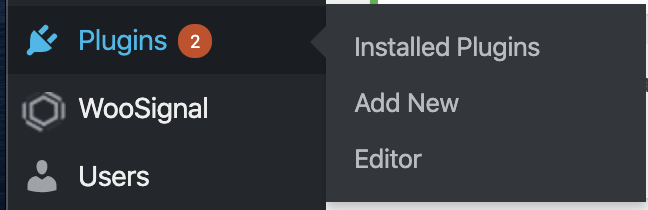
Select "Add New" and proceed to the next step below.
-
Then select "Upload plugin" like the below image

This will open a box below where you can upload a .zip file.
-
Click "Choose file" can look for the WooSignal plugin you downloaded and select the .zip file to install. After you select "Install Now". You should then be able to activate the plugin from your WordPress admin to start using it.
-
If you followed all the steps above you should now be ready to start using the plugin in Flutter.
Next
Install the Flutter package
1. Add the following line to your pubspec.yaml file
dependencies:
  wp_json_api: ^5.0.0
2. Install it
You can install packages from the command line:
$ flutter pub get
3. Import it
import 'package:wp_json_api/wp_json_api.dart';
Initializing WPJson in Flutter
In your main.dart file initialize WPJsonAPI with your WordPress site's URL like the following example below
import 'package:wp_json_api/wp_json_api.dart';
...

void main() {

WPJsonAPI.instance.init(baseUrl: "https://mysite.com");

...
init also accepts:
WPJsonAPI.instance.init(
    baseUrl: "https://mysite.com",
    wpJsonPath: "/wp-json", // optional - your site's REST API path
    shouldDebug: false, // optional - stop logging requests (default: true)
    nylo: nylo, // optional - store the user with Nylo's Auth
);
Response models, exceptions and enums are imported from their own files, for example:
import 'package:wp_json_api/models/responses/wp_user_login_response.dart';
import 'package:wp_json_api/models/wp_meta_meta.dart'; // WpMetaData
import 'package:wp_json_api/models/wp_user.dart'; // WpUser
import 'package:wp_json_api/enums/wp_meta_data_action_type.dart';
import 'package:wp_json_api/exceptions/invalid_credentials_exception.dart';
Then call any method from the request callback
try {
WPUserLoginResponse wpUserLoginResponse = await WPJsonAPI.instance
          .api((request) => request.wpLogin(
            login: usernameOrEmail,
            password: password
          ));
} on InvalidCredentialsException {
    print("The login details are incorrect");
} on Exception catch (e) {
    print(e);
}
Authentication
After a successful login or register, the user and their token are stored on the device. Every authenticated request then sends the token in the Authorization: Bearer <token> and X-WPApp-Token: <token> headers. You can pass userToken: to any authenticated method to use a different token.
Tokens expire (90 days by default, set on the server). You can ask for a shorter lifetime with expiresIn (seconds) when logging in or registering.
bool isLoggedIn = await WPJsonAPI.wpUserLoggedIn(); // false if the token has expired
DateTime? expiresAt = await WPJsonAPI.wpUserTokenExpiresAt();
WpUser? user = await WPJsonAPI.wpUser();
If a request throws InvalidUserTokenException, the token is no longer valid (expired, revoked or the password changed elsewhere). Log the user out and ask them to login again.
Note: users with admin-level access (e.g. administrators and shop managers) can't login through the API unless the site allows it. They get a
PrivilegedUserException.
Error handling
A request is successful only when the server returns an HTTP 2xx status. Otherwise a typed exception is thrown, based on the error code returned by the plugin. Each exception has a message from the server that you can show to the user.
Server code |
HTTP | Exception |
|---|---|---|
wpapp_unauthorized |
401 | InvalidUserTokenException |
wpapp_privileged_user |
403 | PrivilegedUserException |
wpapp_invalid_credentials |
401 | InvalidCredentialsException |
wpapp_login_blocked |
403 | LoginBlockedException (show its message) |
wpapp_too_many_attempts |
429 | TooManyAttemptsException (retryAfter in seconds) |
wpapp_registration_disabled |
403 | RegistrationDisabledException |
wpapp_username_taken |
409 | UsernameTakenException |
wpapp_email_exists |
409 | UserAlreadyExistException |
wpapp_invalid_email |
400 | InvalidEmailException |
wpapp_weak_password |
400 | WeakPasswordException |
wpapp_meta_key_not_allowed |
403 | MetaKeyNotAllowedException (key is the refused key) |
wpapp_incorrect_password |
403 | IncorrectPasswordException |
wpapp_woocommerce_missing |
501 | WooCommerceNotFoundException |
wpapp_points_rewards_missing |
501 | PointsAndRewardsNotFoundException |
wpapp_invalid_params, rest_missing_callback_param, rest_invalid_param |
400 | InvalidParamsException |
wpapp_server_error and any other code |
4xx/5xx | WPServerException (code, status, data) |
| No response (offline, timeout) | - | WPNetworkException (error is the underlying error) |
Exceptions are imported from package:wp_json_api/exceptions/..., e.g.
import 'package:wp_json_api/exceptions/too_many_attempts_exception.dart';

try {
  await WPJsonAPI.instance.api((request) => request.wpLogin(login: login, password: password));
} on TooManyAttemptsException catch (e) {
  print("Try again in ${e.retryAfter} seconds");
}
API Requests: WordPress
WordPress Login
Login as a user on WordPress. On success the user and their token are stored on the device for future requests.
logincan be the username or the email. You can also passemail:orusername:instead oflogin:
Method
WPUserLoginResponse wpUserLoginResponse = await WPJsonAPI.instance
      .api((request) => request.wpLogin(
          login: usernameOrEmail,
          password: password,
          // expiresIn: 3600, // optional - token lifetime in seconds
          // deviceName: "Luke's iPhone", // optional - shown to admins
      ));

print(wpUserLoginResponse.data?.token);
print(wpUserLoginResponse.data?.expiresAtDateTime);
print(wpUserLoginResponse.data?.user?.email);
Returns WPUserLoginResponse
Data? data;
    String? token;
    int? expiresAt; // Unix timestamp in seconds
    DateTime? expiresAtDateTime;
    Data? user; // the same fields as WPUserInfoResponse.data

String? message;
int? status;
Throws InvalidCredentialsException, LoginBlockedException, PrivilegedUserException or TooManyAttemptsException.
Register a user
Register a user on WordPress. On success the user and their token are stored on the device.
- The username is optional, the server will generate one from the email if not provided
metaDataonly accepts keys on the site's allow-list (by default the WooCommerce billing and shipping fields)
Method
WPUserRegisterResponse wpUserRegisterResponse = await WPJsonAPI.instance
      .api((request) => request.wpRegister(
          email: email,
          password: password,
          // username: username, // optional
          // firstName: firstName, // optional
          // lastName: lastName, // optional
          // metaData: {"billing_phone": "0123456789"}, // optional
      ));
wpRegister also accepts expiresIn and deviceName, like wpLogin.
Returns WPUserRegisterResponse
Data? data;
    String? token;
    int? expiresAt; // Unix timestamp in seconds
    DateTime? expiresAtDateTime;
    Data? user;

String? message;
int? status;
Throws RegistrationDisabledException, UsernameTakenException, UserAlreadyExistException, InvalidEmailException, WeakPasswordException, MetaKeyNotAllowedException or TooManyAttemptsException.
WordPress Logout
- Revokes the token on the server and removes the user from the device
- The user is always removed from the device, even if the request fails
- Returns
trueif the server revoked the token
Method
bool revoked = await WPJsonAPI.instance
        .api((request) => request.wpLogout());
WordPress Users Info
Returns the logged in user's info from WordPress.
Method
WPUserInfoResponse wpUserInfoResponse = await WPJsonAPI.instance
        .api((request) => request.wpGetUserInfo());

String? city = wpUserInfoResponse.data?.getMetaDataFirstWhere("billing_city");
Returns WPUserInfoResponse
Data? data;
    int? id;
    String? username;
    String? email;
    String? firstName;
    String? lastName;
    String? displayName;
    String? avatar;
    List<String>? roles;
    List<MetaData>? metaData; // allow-listed keys only
    String? createdAt;

String? message;
int? status;
Use getMetaDataFirstWhere(key) for the first value of a meta key, or getMetaDataArrayWhere(key) for all of its values.
Update Users Info
Update the logged in user's info.
metaDataonly accepts keys on the site's allow-list. One key that is not allowed fails the whole request with aMetaKeyNotAllowedExceptionWpMetaDatatakes an optionalaction:WPMetaDataActionType.Update(default),WPMetaDataActionType.Create(with optionalunique: true) orWPMetaDataActionType.Delete
Method
WPUserInfoUpdatedResponse wpUserInfoUpdatedResponse = await WPJsonAPI.instance
        .api((request) => request.wpUpdateUserInfo(
          firstName: firstName,
          lastName: lastName,
          displayName: displayName,
          metaData: [
            WpMetaData(key: "billing_city", value: "London"),
          ],
      ));

print(wpUserInfoUpdatedResponse.data?.firstName); // the updated user
Returns WPUserInfoUpdatedResponse
Data? data; // the updated user, the same fields as WPUserInfoResponse.data
String? message;
int? status;
Update Users Password
Change the logged in user's password.
- The user's current password is required
- The user's other tokens are revoked; the current token stays valid
Method
WPUserResetPasswordResponse wpUserResetPasswordResponse = await WPJsonAPI.instance
        .api((request) => request.wpResetPassword(
            currentPassword: currentPassword,
            password: newPassword
        ));
Returns WPUserResetPasswordResponse
List<dynamic>? data;
String? message;
int? status;
Throws IncorrectPasswordException if currentPassword is wrong, or WeakPasswordException.
Delete a user
Delete the logged in user's account.
- The user's current password is required
- On success the user is removed from the device
Method
WPUserDeleteResponse wpUserDeleteResponse = await WPJsonAPI.instance
        .api((request) => request.wpUserDelete(
            password: password
        ));
Returns WPUserDeleteResponse
List<dynamic>? data;
String? message;
int? status;
Throws IncorrectPasswordException if the password is wrong.
API Requests: WooCommerce
WooCommerce Register
Register a user as a WooCommerce customer. Takes the same parameters as wpRegister.
Method
WPUserRegisterResponse wpUserRegisterResponse = await WPJsonAPI.instance
      .api((request) => request.wcRegister(
          email: email,
          password: password
      ));
WooCommerce Get Users Info
Returns the logged in user's WooCommerce customer info, including the billing and shipping.
Method
WCCustomerInfoResponse wcCustomerInfoResponse = await WPJsonAPI.instance
          .api((request) => request.wcCustomerInfo());
Returns WCCustomerInfoResponse
Data? data;
    int? id;
    String? firstName;
    String? lastName;
    String? displayName;
    String? avatar;
    Shipping? shipping;
        String? firstName;
        String? lastName;
        String? company;
        String? address1;
        String? address2;
        String? city;
        String? state;
        String? postcode;
        String? country;
        String? phone;
    Billing? billing;
        String? firstName;
        String? lastName;
        String? company;
        String? address1;
        String? address2;
        String? city;
        String? state;
        String? postcode;
        String? country;
        String? email;
        String? phone;
    List<MetaData>? metaData;
    String? createdAt;

String? message;
int? status;
Throws WooCommerceNotFoundException if WooCommerce is not active on the site.
WooCommerce Update Users Info
Update the logged in user's WooCommerce details. All the parameters are optional, so if you just want to update the name, only pass firstName and lastName.
Method
WCCustomerUpdatedResponse wcCustomerUpdatedResponse = await WPJsonAPI.instance
        .api((request) => request.wcUpdateCustomerInfo(
            firstName: firstName,
            lastName: lastName,
            displayName: displayName,
            billingFirstName: billingFirstName,
            billingLastName: billingLastName,
            billingCompany: billingCompany,
            billingAddress1: billingAddress1,
            billingAddress2: billingAddress2,
            billingCity: billingCity,
            billingState: billingState,
            billingPostcode: billingPostcode,
            billingCountry: billingCountry,
            billingEmail: billingEmail,
            billingPhone: billingPhone,
            shippingFirstName: shippingFirstName,
            shippingLastName: shippingLastName,
            shippingCompany: shippingCompany,
            shippingAddress1: shippingAddress1,
            shippingAddress2: shippingAddress2,
            shippingCity: shippingCity,
            shippingState: shippingState,
            shippingPostcode: shippingPostcode,
            shippingCountry: shippingCountry,
            shippingPhone: shippingPhone
        ));

print(wcCustomerUpdatedResponse.data?.billing?.city); // the updated customer
Returns WCCustomerUpdatedResponse
Data? data; // the updated customer, the same fields as WCCustomerInfoResponse.data
String? message;
int? status;
API Requests: Points and Rewards
These methods need the WooCommerce Points and Rewards plugin on your site. Without it they throw PointsAndRewardsNotFoundException.
Get user's points
Returns the logged in user's points and their value.
Method
WcPointsAndRewardUser wcPointsAndRewardUser = await WPJsonAPI.instance
          .api((request) => request.wcPointsAndRewardsUser());
Returns WcPointsAndRewardUser
int? id;
int? points;
String? value;
Calculate the value of points
Returns the value of a number of points.
Method
WcPointsAndRewardCalculatePoints wcPointsAndRewardsCalculatePoints = await WPJsonAPI.instance
          .api((request) => request.wcPointsAndRewardsCalculatePoints(
          points: 100
      ));
Returns WcPointsAndRewardCalculatePoints
String? value;
Migrating from 4.x
5.0 only works with the WP JSON API WordPress plugin 5.0 or later. Update the plugin on your site first; the plugin keeps the old v3 API working for apps that are still on 4.x.
Authentication
- The token is sent in the
Authorization: BearerandX-WPApp-Tokenheaders instead of the request body. No code change is needed if you use the stored token. - There is no nonce anymore.
wpNonce()andwpNonceVerify()have been removed. - Tokens always expire.
WPJsonAPI.wpUserLoggedIn()returnsfalseonce the stored token has expired. Sessions saved by 4.x have no expiry and are treated as logged out, so your users will need to login once after updating. - Users with admin-level capabilities (administrators, shop managers) can't login through the API unless the site allows it. They get a
PrivilegedUserException.
Method changes
| 4.x | 5.0 |
|---|---|
wpLogin(email: e, password: p, authType: WPAuthType.WpEmail) |
wpLogin(login: e, password: p) (email: and username: still work) |
wpLogin(..., tokenExpiryAt: "+1 day") |
wpLogin(..., expiresIn: 86400) |
wpRegister(..., expiry: ..., args: {...}) |
wpRegister(..., expiresIn: ..., firstName: ..., lastName: ..., metaData: {...}) |
wpResetPassword(password: p) |
wpResetPassword(currentPassword: current, password: p) |
wpUserDelete(reassign: id) |
wpUserDelete(password: p) |
wpLogout() (local only) |
wpLogout() revokes the token on the server, then clears the device. Returns Future<bool> |
wpUserAddRole(role: r), wpUserRemoveRole(role: r) |
Removed. Manage roles on the server |
wpNonce(), wpNonceVerify(nonce: n) |
Removed |
wcUpdateCustomerInfo(shippingEmail: ...) |
Removed (not a WooCommerce shipping field) |
Response changes
WPUserLoginResponse.data/WPUserRegisterResponse.data:userTokenis nowtoken,expiryis nowexpiresAt(Unix seconds), and the user's details moved touser(e.g.data?.userIdis nowdata?.user?.id,data?.emailis nowdata?.user?.email).WPUserInfoResponse.data:userNicenameanduserStatuswere removed.metaDataonly contains keys on the site's allow-list.WPUserInfoUpdatedResponse.dataandWCCustomerUpdatedResponse.datanow contain the updated user / customer.WpMetaData.uniqueis now abool?.WpUserhas a newexpiresAt,expiresAtDateTimeandisTokenExpired.
Exceptions
- Errors are now based on the HTTP status and the error
code; see Error handling. - Removed:
InvalidNonceException,EmptyUsernameException,ExistingUserLoginException(nowUsernameTakenException),ExistingUserEmailException(nowUserAlreadyExistException) andInvalidUsernameException(login failures are nowInvalidCredentialsException;IncorrectPasswordExceptionis only used when confirming the password to change it or delete the account). - New:
InvalidCredentialsException,LoginBlockedException,PrivilegedUserException,TooManyAttemptsException,RegistrationDisabledException,WeakPasswordException,MetaKeyNotAllowedException,PointsAndRewardsNotFoundException,WPServerExceptionandWPNetworkException. - Requests that fail without a response throw
WPNetworkExceptioninstead of aDioException.
Note: once all your app users are on wp_json_api 5.x, turn off the deprecated v3 API in Settings → WP JSON API on your WordPress site.